Pages

Social Icons

Saturday, 26 September 2015

How to create SSRS report in newspaper format

This post is about how to create the SSRS reports in the newspaper format i.e. if you want to move your data from first column, then second column, then third and then you wanted to move on to third page then how you can achieve this in SSRS.
For that there is very simple solution in SSRS.
Select the RDL click on the outside the rdl on report area(yellow screen) and press F4. Now property window will open there change the column value from 1 to three.

Then you report RDL will convert into three columns like below


Thanks,
RS

Monday, 10 August 2015

Strikethrough selected text JavaScript

Here is code which shows how to strike though the selected text in textbox using JavaScript.


<script type="text/javascript" language="javascript">

    function sendtext(input) {
        var striketext = '';
        var textvar = $('#txtText').val().substr(input.selectionStart, (input.selectionEnd - input.selectionStart));
        $.each(textvar.split(''), function () {
            striketext += '\u0336' + this;
        });
        var result = $('#txtText').val().substr(0, input.selectionStart) + striketext + $('#txtText').val().substr(input.selectionEnd, $('#txtText').val().length);
        $('#txtText1').val(result);
    }

</script>
<h2>Index</h2>

<input id="txtText" type="text">

<input id="txtText1" type="text">

<input type="button" value="click" onclick="sendtext(document.getElementById('txtText'))"/>

Tuesday, 28 April 2015

Simple tricks in SQL-Server

Here I am going to explain some cool tricks in SQL-Server.

Trick 1: Code Wrap

Some times will see our code is going to beyond the window size and will get the scroll bar at the bottom and every time we need to scroll to see the full code. We can remove this scroll bar just setting the word-wrap property in SQL- Server.

For this go into the tools -> Options

In the pop up window select text -> General. In this click on the word wrap check box and hit the ok button.


Trick 2: Create Table from another table with out data

If we want to create a table from another table but with out data. Then we can use the below query.

 SELECT * INTO ChatMessage FROM Chat WHERE id = 0

Trick 3: Short cut to select all rows from the table

For selecting all the rows from the table every time we are writing a query as below

SELECT * FROM ChatMessage

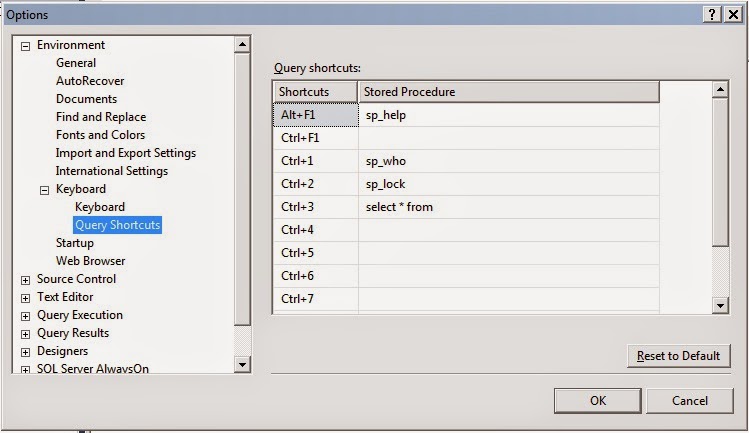
In SQL-Server we can assign the shortcut key for this as below.


  • Go to Tools -> Options
  • In the pop up window select Keyboard -> Query Shortcut
  • Now select any blank shortcut key and write "SELECT * FROM ". Make sure you will have a blank space after from.


Now go to the query window and write only the table name. Select the table and press the shortcut key which you have assigned.

Thanks,
RS


Wednesday, 18 March 2015

Code formatting in SQL-Server

I have noticed that code formatting is a difficult task for many of us. I found one small plugin notepad++ in order to do the code formatting. Below are the steps.

1. Download notepad++ Download Link
2. Go Plugins menu and select Plugin manager -> Show plugin manager.
3. In the window search Poor Man's T-Sql Formatter and install.

After performing the above steps close and open your notepad++.

Now copy your code and paste it in notepad++ and run the plugin by selecting from Plugins -> Poor Man's T-Sql Formatter.

Tuesday, 3 March 2015

Find the foreign key and Generate the drop statement

This post will help to find to the all the constraint and generate the drop statement for all foreign key constraint.

Below is the code.


DECLARE @temp TABLE (
       RowId INT PRIMARY KEY IDENTITY(1, 1)
       ,FKConstraint NVARCHAR(200)
       ,FKConstraintTblSch NVARCHAR(200)
       ,FKConstraintTbNm NVARCHAR(200)
       ,FKConstraintClNm NVARCHAR(200)
       ,PKConstraint NVARCHAR(200)
       ,PKConstraintTblSch NVARCHAR(200)
       ,PKConstraintTblNm NVARCHAR(200)
       ,PKConstraintClmNm NVARCHAR(200)
       )

INSERT INTO @temp (
       FKConstraint
       ,FKConstraintTblSch
       ,FKConstraintTbNm
       ,FKConstraintClNm
       )
SELECT U.CONSTRAINT_NAME
       ,U.TABLE_SCHEMA
       ,U.TABLE_NAME
       ,U.COLUMN_NAME
FROM INFORMATION_SCHEMA.KEY_COLUMN_USAGE U
INNER JOIN INFORMATION_SCHEMA.TABLE_CONSTRAINTS C ON U.CONSTRAINT_NAME = C.CONSTRAINT_NAME
WHERE C.CONSTRAINT_TYPE = 'FOREIGN KEY'

UPDATE @temp
SET PKConstraint = UNIQUE_CONSTRAINT_NAME
FROM @temp T
INNER JOIN INFORMATION_SCHEMA.REFERENTIAL_CONSTRAINTS R ON T.FKConstraint = R.CONSTRAINT_NAME

UPDATE @temp
SET PKConstraintTblSch = TABLE_SCHEMA
       ,PKConstraintTblNm = TABLE_NAME
FROM @temp T
INNER JOIN INFORMATION_SCHEMA.TABLE_CONSTRAINTS C ON T.PKConstraint = C.CONSTRAINT_NAME

UPDATE @temp
SET PKConstraintClmNm = COLUMN_NAME
FROM @temp T
INNER JOIN INFORMATION_SCHEMA.KEY_COLUMN_USAGE U ON T.PKConstraint = U.CONSTRAINT_NAME

--SELECT * FROM @temp
--DROP CONSTRAINT:
SELECT 'ALTER TABLE [' + FKConstraintTblSch + '].[' + FKConstraintTbNm + ']
DROP CONSTRAINT ' + FKConstraint + ' GO'

FROM @temp

Thx,
RS

Tuesday, 9 December 2014

Blank page in SSRS

In SSRS some times we are facing the problem of blank pages and so many times it will became night mare to fix this issue.

Reason: Whenever we are hiding the rows or columns in SSRS it will take the blank space for the hidden row.

Solution: Now there are two solution for this problem.
  1. Give the minimum possible width to the row or minimum possible height to the column. This is not a better way to fix this problem.
  2. To fix this problem in a better way you can set the ConsumeContainerWhitespace = True in reports property.


Thx,
RS

Tuesday, 25 November 2014

How to find nth highest salary

In this post I will explain how to get the nth highest salary for an employee in different ways. I have below record present in my employee table.

So first is the quite straight forward query


Now second we go with the sub query so that we can find nth salary as well.


So this query you can use to get the nth salary also, for that you have to change the number 2 from TOP 2 salary

Now third we can get the nth highest salary using co-related query as well.


Note: This query will not work with the duplicate salary.

Now we can use cte (common table expression) also for this.


This query will also not work with the duplicate salary. If you want to use the CTE for duplicate salary as well then you have to use the dense rank instead of Rank.


In the above query if you want to get the nth salary then you can change the number 2 with any number.

Thx,
RS

Monday, 15 September 2014

SQL-Server : Find value of a column in entire database

Some times we need to find one column is present in how many tables with the same value. For example I have employee database. In this empid column is present in 7 table. Now I want to check empid 101 is present in how many table. This we can find with below stored procedure.

CREATE PROCEDURE GetColumnValueInDatabase 
        @value VARCHAR(max) --value which we want to search
       ,@searchColumn VARCHAR(250)--specify the column name for which we need to search the value
AS
BEGIN
       DECLARE @qry VARCHAR(max)
       DECLARE @tabl TABLE (
              table_name VARCHAR(350)
              ,columnname VARCHAR(350)
              ,isprocessed BIT
              ,tableschema VARCHAR(5)
              )
       DECLARE @tabl_1 TABLE (
              table_name VARCHAR(350)
              ,columnname VARCHAR(350)
              )

       INSERT INTO @tabl
       SELECT tbls.TABLE_NAME
              ,cols.COLUMN_NAME
              ,0
              ,tbls.TABLE_SCHEMA
       FROM INFORMATION_SCHEMA.TABLES AS tbls
       JOIN INFORMATION_SCHEMA.COLUMNS AS cols ON tbls.TABLE_NAME = cols.TABLE_NAME
       WHERE cols.COLUMN_NAME = @searchColumn

       DECLARE @table_name VARCHAR(350)
              ,@columnname VARCHAR(350)
              ,@tblSchema VARCHAR(5)

       WHILE EXISTS (
                     SELECT 1
                     FROM @tabl
                     WHERE isprocessed = 0
                     )
       BEGIN
              SELECT TOP 1 @table_name = table_name
                     ,@columnname = columnname
                     ,@tblSchema = tableschema
              FROM @tabl
              WHERE isprocessed = 0
              ORDER BY table_name DESC

              SET @qry = 'SELECT ''' + @table_name + ''', ''' + @columnname + ''' FROM ' + @tblSchema + '.' + @table_name + ' where ' + @columnname + ' = ' + @value

              PRINT (@qry)

              INSERT @tabl_1
              EXEC (@qry)

              UPDATE @tabl
              SET isprocessed = 1
              WHERE table_name = @table_name
                     AND columnname = @columnname
       END

       SELECT *
       FROM @tabl_1
END


Example

EXEC GetColumnValueInDatabase 101,'empid'

Thx,
RS

Sunday, 14 September 2014

SQL Server - Enabling Service Broker

In this post I will cover to enable the service broker id and solution of some error related to this.

With the help of below query we can see what is the service broker id of database and whether it is enabled or not.

SELECT
    is_broker_enabled AS IsServiceBrokerEnabled,
    service_broker_guid AS ServiceBrokerGUID,
    name AS DatabaseName,
    database_id AS DatabaseId

FROM sys.databases

In below screen shot highlighted row shows that service borker is not enabled for the database TestDatabase.


We can enable the service broker queue with the help of below query

ALTER DATABASE Database_Name SET ENABLE_BROKER;

If you have database which is huge in size then above query may take time. In that case you can use the below query.

ALTER DATABASE Database_Name SET ENABLE_BROKER WITH ROLLBACK IMMEDIATE;

Now, some time we are getting the error 

Msg 9772, Level 16, State 1, Line 1 
The Service Broker in database "Database_Name" cannot be enabled because there is already an enabled Service Broker with the same ID.


This error is coming because there is already one database which is having the same service broker id and system is trying to enable another database with the same service broker id. The solution of this error is to generate the new service broker id for the database. This we can achieve with below query

ALTER DATABASE Database_Name SET NEW_BROKER;

If you have database which is huge in size then above query may take time. In that case you can use the below query.

ALTER DATABASE [Database_name] SET NEW_BROKER WITH ROLLBACK IMMEDIATE;

Thx,
RS


Thursday, 31 July 2014

How to Identify port number of SQL server

Hi, 

With the help of below query we can check the port number of sql server


select
 distinct local_net_address,
 local_tcp_port
from
 sys.dm_exec_connections
where

 local_net_address is not null

Thx, 
RS

Monday, 14 July 2014

how to check the dependencies of an object in SQL Server

Hi All,

This video will demonstrate you how to check the dependencies of an object.


Thx,
RS

Tuesday, 27 May 2014

How to rename an existing column using sp_rename

In this video I am showing how to rename an existing column using sp_rename.


Thx,
RS

Sunday, 25 May 2014

SQL Server Basics

This post is for Basics of SQL Server. I will cover below topics in this post

  • Create Table
  • Data Types
  • Variable Declaration
  • CURD Operations 
  • Joins Operators

Create Table

SQL server gives you the provision of creating table using design mode. Here I am showing the example How to create with query prompt.


CREATE Table TestTable1
(
      Id BIGINT
      ,Column1 VARCHAR(150)
      ,Column2 BIGINT
      ,Column3 DATETIME
)

This example is only for creating the table. While creating the table we can create the primary key, Index or we can the other properties as well.

Data Types

SQL-Server is having so many data types. I have already explain all the data types in this Link

Variable Declarations

In SQL-Server we can declare the variable using below syntax.

DECLARE @Temp VARCHAR(50)

SQL-Server 2012 we can declare and assign the variable at the same time

DECLARE @Temp VARCHAR(50) = 'Rahul Singi'

CURD Operations


Insert Statements:  Below is the example of insert data in table


INSERT INTO [dbo].[TestTable1]
          ([Id]
           ,[Column1]
              ,[Column2]
           ,[Column3])
    VALUES
             (1001
              ,'Rahul Singi'
           ,5001
           ,'02-23-1985')

INSERT INTO [dbo].[TestTable1] VALUES (1002 ,'Rahul Singi' ,5001 ,'02-23-1985')

For More detail you can use this Link

Update Statements:  Below is the example of Update data in table

     UPDATE TestTable1 SET Column1 = 'Gaurav' WHERE Id = 1002

If we will not use WHERE clause in update statement then it will update all the rows of the table. 
     For More detail you can use this Link
. 
     Select Statements: Below is the example of Select data in table. Select statement begins with the list of columns or expressions. At least one expression is required.

SELECT 1

SELECT GETDATE()

SELECT
      [Column1]
      ,[Column2]
      ,[Column3]
FROM
      TestTable1

From portion of the select statement assembles all the data source into a result set, which is then acted upon by the rest of the SELECT statements.
WHERE clause acts upon the record set  assembled by the FROM clause to filter certain rows based upon condition.
     
    For More detail you can use this Link

    Delete Statements: Below is the example of Select data in table

DELETE FROM TestTable1 WHERE Id = 1001

    For More detail you can use this Link

   Join Operators
   
   Inner Join: Inner join will give you the result of common rows from the two tables. Below is the pictorial representation of inner join
Below is the example query:

SELECT
      *
FROM
      TestTable1 T1
INNER JOIN
      TestTable2 T2
      ON
T1.id = T2.Id

    Outer Joins: There are three types of Outer Join.

    Left Outer Join: Left join will give you the result of common rows from the two tables and all the data from Left table. Below is the pictorial representation of Left Join
Below is the example query:


SELECT
      *
FROM
      TestTable1 T1
LEFT JOIN
      TestTable2 T2
      ON
      T1.id = T2.Id

     Right Outer Join: Right join will give you the result of common rows from the two tables and all the data from Right table. Below is the pictorial representation of Right Join
Below is the example query:


SELECT
      *
FROM
      TestTable1 T1
RIGHT JOIN
      TestTable2 T2
      ON
T1.id = T2.Id

     Full Outer Join: Full join will give you the result of all rows. Below is the pictorial representation of Full Join.
Below is the example query:

SELECT
      *
FROM
      TestTable1 T1
FULL OUTER JOIN
      TestTable2 T2
      ON
T1.id = T2.Id
    
    Thx,
    RS